.png)
N8N
A deep dive into N8N automation and how it can be used to create a more efficent workflow
UX Designer & Researcher
Graduate Assistant Research Project
N8N Overview
What is it?
n8n (pronounced "n-eight-n") is a workflow automation tool that connects your apps, databases, and AI agents together.
.jpeg)
What it does
Creates a form then sends a slack notification for approval
Experience
For my graduate research, I chose to do a deep dive into N8N and learn the ins and outs. I then led a presentation and workshop through the MeetUp group I am an organizer for https://www.meetup.com/nycuxd on what N8N is and how to use it. Below are the three flows I perfected and their outcomes.

1. Wix Blog
What is it?
I used an advanced AI agent to research, write, generate art, and publish. I had this automated so that all I had to do was type in the title of a blog and then the target audience.
Goal: 1-Click Blog Generator

Steps
There are a lot of steps that go into automating the blog generator, but for a high-level overview, I have simplified it into 4 steps below.
-
Connect the Brains: Tavily (Web Search) + OpenRouter (LLM).
-
Connect Wix: Authorize with Site ID & API Key.
-
Generate Art: OpenAI (DALL-E 3) creates cover.
-
Execute: Topic Input -> Full Draft Post in CMS.

Final Product
I was able to easily post a blog to my Wix website that had correct information and a nice image attached. Click the button below to check out the blog website!


2. Google Slides
What is it?
I used an advanced AI agent to research, write, generate art, and create a google slide deck. I had this automated so that all I had to do was type in the title of what the slide deck is about. This slide deck is what I then presented at my workshop.
Goal: Create a slideshow presentation

Steps
The 4 high-level steps are as follows:
-
Start with an LLM model: I chose to use Gemini but you can use a different one
-
Connect Slide creator: I chose Google Slides
-
Set up an "AI Agent" node
-
Create an Action Loop
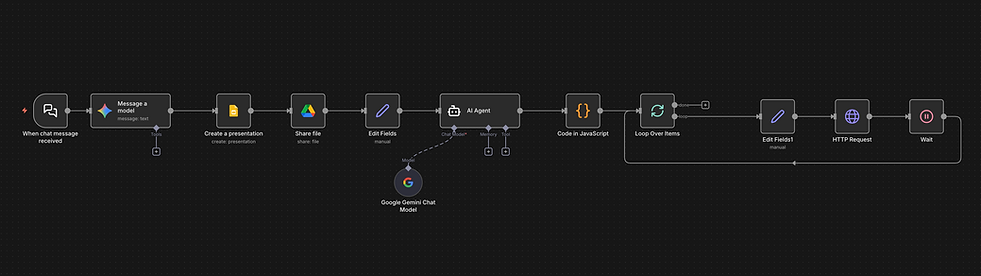
Final Product
There were a few tweaks I had to do here and there to add my own examples and to specify certain points, but the automated slide deck made by N8N created almost every slide below.


3. Inquiry Form
What is it?
I used an advanced AI agent to create an inquiry form, and whenever someone would enter the form and choose a date under 7 days away, an urgent notification would be sent to a Slack channel so that someone can check out the inquiry.
Goal: Urgent Request Alert

Steps
The 4 high-level steps are as follows:
-
Logic: "If" Node. Condition: Date < {{ $now.plus(7, 'days') }}
-
True Path: Send Slack Message to #marketing.
-
False Path: Do nothing (or send standard email).

Final Product
I was easily able to have someone answer the form and get a slack notification when it was under 7 days away.
